funnyapp.site Mac apps, funny first

Independent macOS apps · direct download · no App Store

Funny premise.
Serious build.

This is where we publish the Mac apps we write ourselves and hand out as a download. Each one starts as a joke you can explain in one sentence — then gets built like it matters: signed, notarised, offline licences, and results you can trace back to a request.

  • 1 app in the catalogue
  • macOS 12+
  • Apple silicon & Intel
  • US$6.99 one-time
  • No account
  • Signed & notarised
Catalogue — 001

The catalogue

One app so far. That is the fun test doing its job, not the site being unfinished.

Passes the fun test HandleLens app icon: a lime-green magnifying glass with an @ symbol inside, on a dark green rounded square

01 · Utilities & research · macOS 12+

HandleLens

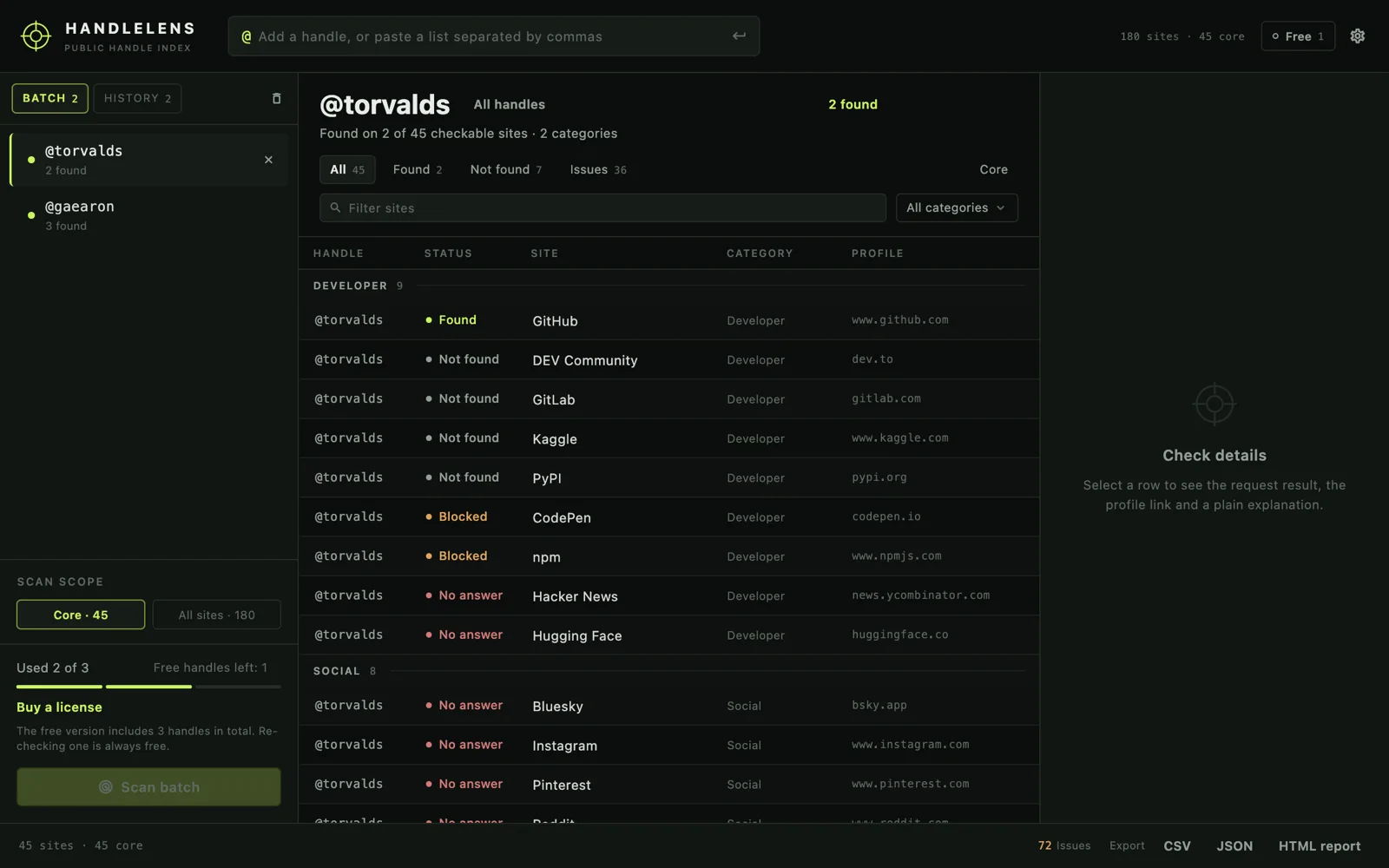
Type a username. It checks 180 public sites and gives you a verdict for each one — with the request, the status code and the rule that decided it.

The joke: “is this name taken?” — asked of 180 websites at once, from a laptop.

Version 1.1.0 DMG 23 MB Price US$6.99 one-time Free 3 usernames Also a command line
HandleLens window: a batch list of two usernames, results for torvalds across developer sites with found, blocked and no-answer verdicts, and a details pane

02 — in the workshop. It gets a name and a download button on the day it is notarised, not before.

House rules

What “funny” has to mean here

Funny is the entry requirement, not the selling point. An app joins the catalogue only if it survives all five.

  1. 01

    One sentence, slightly absurd

    If the pitch needs a second sentence to make sense, it is a product idea rather than a funny one. The good ones sound like a dare rather than a feature list: check a username against 180 websites at once.

    Most ideas fail here. That is the point of a test.
  2. 02

    Then it has to be exact

    A funny premise only earns the build if the tool tells the truth. Every result keeps its evidence: the URL requested, the status returned, the rule applied. A site that refuses an automated request is labelled as such and never quietly reported as “not found”.

    Fails at: the first verdict that is dressed up to look better than it is.
  3. 03

    It runs on your Mac, not on our server

    Local scanning, local files, licence keys checked offline with a public key built into the app. If the app needs us online to be useful, we have built a website and forgotten to say so.

    Fails at: “sign in to continue”.
  4. 04

    One job, one window, one price

    No dashboards, no streaks, no subscription prompted inside the app twice a week. You pay once, and the app keeps working years later, on whatever version you paid for.

    Fails at: a feature list longer than the job description.
  5. 05

    It has to be able to die

    Everything exports to a file you can read, the licence verifies without a phone call home, and uninstalling is one drag to the Trash. An app you cannot leave is not funny; it is a contract.

    Fails at: data that only exists inside the app.
Installing

A DMG, a drag, and macOS is happy.

No installer, no script, no “allow anyway” scavenger hunt. Every release is signed and notarised before it goes up.

  1. STEP 01 Download the DMG A single file, over HTTPS, from this site. The size and SHA-256 are printed on the app page and next to the download.
  2. STEP 02 Drag it to Applications Open the disk image, drag the app across, eject the image. There is nothing else to install and nothing to configure first.
  3. STEP 03 Open it Apple has already seen this exact build. If macOS still hesitates while you are offline, right-click the app → Open, once.
Signed
Apple Developer ID certificate on every release; check it yourself with codesign -dv.
Notarised
Submitted to Apple's notary service and stapled, so Gatekeeper can vouch for it without a network call.
Checksummed
A SHA-256 per build, published in the app page and in the download folder.
No telemetry
No analytics SDK, no crash uploader, no account. The app is a program, not a relationship.
# check what you just downloaded, before you open it
shasum -a 256 ~/Downloads/HandleLens-1.1.0.dmg
2abb8369c81267883fe4239718fda9cf37c35c409c9e5223599f3e39bbd825aa  HandleLens-1.1.0.dmg
Questions

The short answers

If something here is wrong or missing, write to support@swordfishsoft.org — we answer.

Are these apps on the Mac App Store?

No. Every app here is distributed directly: a DMG from this site, and a one-time licence bought through Paddle. No store account, no commission folded into the price, no review queue between you and an update.

The trade-off is honest: updates come from the app itself rather than from the App Store badge, so the signature, the notarisation ticket and the published checksum do the job that the store would otherwise do.

Will macOS block the download?

It should not. Each release is signed with an Apple Developer ID certificate and notarised by Apple, so the first launch is a normal double-click — even offline, because the notarisation ticket is stapled to the app.

If macOS still hesitates, right-click the app and choose Open once. We never ask anyone to disable Gatekeeper, install a helper, or run a script to get an app started.

Do the apps phone home or collect data?

HandleLens has no account, no analytics, no crash reporting and no telemetry. Its network traffic is the public profile checks you start, plus an optional daily update check that can be switched off in Settings. Licence keys are verified offline on your Mac.

This website is static HTML: no cookies, no fonts loaded from elsewhere, no tracking script to consent to.

Is this a subscription?

No. Each app is a one-time purchase for one person, and the version you bought keeps working without a recurring payment. HandleLens is US$6.99 once, with a free edition that checks three usernames in total.

What does “funny” actually mean on this site?

Funny is the entry requirement, not the marketing. An app gets in only if its premise fits in one slightly absurd sentence, and only if it is then built exactly — real evidence behind every result, no invented numbers, no account, and an easy way to take your data out.

See the fun test above. Most ideas fail on the second rule, which is why the catalogue is short.

Refunds, lost licence keys, a second Mac?

Purchases are handled by Paddle, and every purchase carries a 14-day money-back guarantee — the published refund policy has the details. For a lost key or a second machine, write to support@swordfishsoft.org from the address the purchase was made with.

Will there be more apps?

Yes, one at a time. An app appears in the catalogue on the day it is signed, notarised and downloadable — never as a countdown or a waitlist. The catalogue is the roadmap, and the feed tells you when it grows.

One app, one price, one download

Start with the one that checks 180 websites for a username.

Download HandleLens 1.1.0 23 MB What it does macOS 12+ · Apple silicon & Intel · signed & notarised