Catalogue 01 · Utilities & research
HandleLens
One username. 180 websites. A verdict for each, with the evidence still attached.
- US$6.99 one-time
- Free: 3 usernames
- macOS 12+ · universal
- Version 1.1.0
- 23 MB DMG
- English & 简体中文
SHA-256 2abb8369c81267883fe4239718fda9cf37c35c409c9e5223599f3e39bbd825aa · signed with a Developer ID certificate and notarised by Apple · checksums
Why this is in the catalogue
Every app here has to pass the same five rules. Here is how HandleLens passes the first two.
The joke
“Is this name taken?” — asked of 180 websites at once, from a laptop, while the other tabs keep loading.
The work
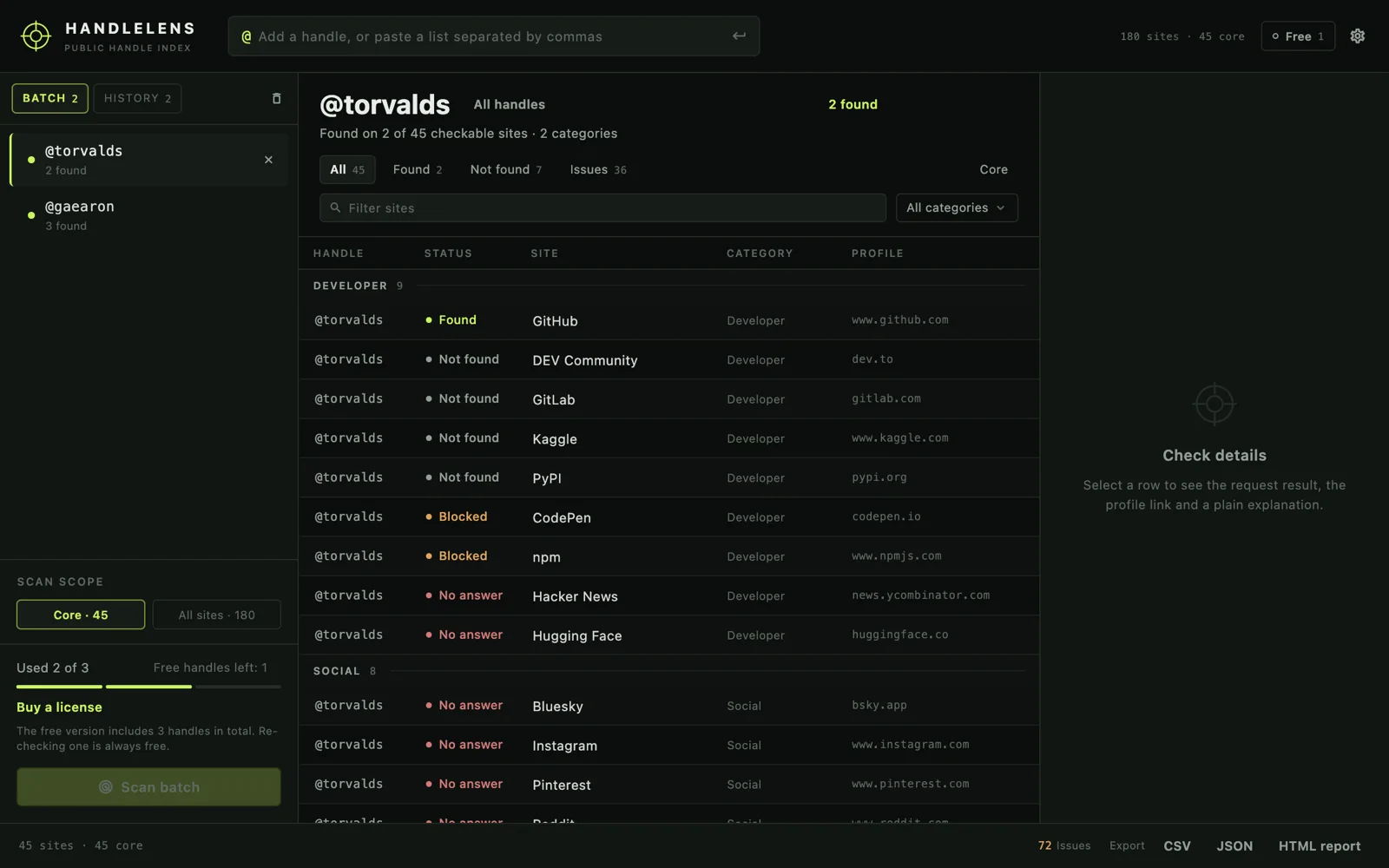
A scan is a set of ordinary public-page requests and nothing more. HandleLens records what it asked, what came back, how long it took, and which rule produced the verdict — so a surprising result can be checked instead of believed. A site that blocks automated requests is reported as blocked, never as “this person does not exist”.
Eight things, in one window
No account, no dashboard, no cloud queue. The batch, the results and the exports stay on the Mac.
One handle, or a batch
Paste a list separated by commas or new lines. Each username keeps its own results, so a second handle never overwrites the first. A local History tab remembers the last 50.
45 core sites, or all 180
The core set is the fast pass — developer, social and community sites where a handle usually surfaces. Widen to the full curated catalogue, 12 categories, when you need the long tail.
Five verdicts, not two
Found, not found, blocked, unclear and no answer are separate outcomes with separate colours. The difference between “absent” and “refused to answer” is the whole point of the app.
The evidence pane
Select any row to see the exact URL requested, the HTTP status, the elapsed time, the detection rule and a link to the profile. Screenshot it for a report; nothing is hidden behind a tooltip.
Filter and export
Filter by verdict, site name, category or core-only. Export the batch as CSV, JSON, or a self-contained HTML report that opens anywhere, with no server and no stylesheet to fetch.
A command line
handlelens ships inside the app and uses the same catalogue, scanner and licence:
JSON output, fixed exit codes, the same reports. Built for scripts — and for AI assistants that
can run Terminal commands.
Two languages
The whole interface is in English and Simplified Chinese, switchable at any time. Verdict names and exports follow the chosen language.
Licence offline
A key is an Ed25519 signature checked on your Mac with a public key compiled into the app. Activation makes no request; the private key never ships.
What each verdict means
The distinction people ask about first: “not found” and “could not tell” are not the same sentence.
| Verdict | What happened | What it proves |
|---|---|---|
| Found | The site returned a valid public profile for that username. | The profile exists now. A link is one click away. |
| Not found | The site answered normally and said there is no such profile. | At the moment of the scan, that handle was free on that site. |
| Blocked | The site refused the request or served a browser challenge. | Nothing about the account — try again later, or open the link yourself. |
| Unclear | The page came back, but its content does not settle the question. | Unknown. The rule that ran is shown, so you can judge it. |
| No answer | The request timed out or the connection failed. | Nothing. A network problem is not evidence about a person. |
| By hand | X, Facebook, VK and Minds cannot be checked without a signed-in session. | Nothing, until you open the link. These rows are never counted as found or missing. |
This is what a row carries
A real hit from the developer category, copied out of the details pane: the request, the status, the timing, the rule, and the profile URL. Nothing about the verdict depends on trusting the app's opinion of itself.
GET  https://gitlab.com/api/v4/users?username=gaearon
HTTP 200 · 765 ms
rule  the site returned a valid profile
link https://gitlab.com/gaearonThree usernames, then one payment
The free count is stored on this Mac and applies to usernames, not scans. Checking a handle again is always free.
| Edition | What you get | Price |
|---|---|---|
| Free | Checks 3 usernames in total across the full 180-site catalogue. Re-checking a username you already checked is free. Every filter, every export format and the whole interface — the free edition is not a demo with pieces removed. | US$0 |
| Licensed | Unlimited usernames, unlimited batches, and the handlelens command line. One
person, one key, no expiry, verified offline. |
US$6.99 once |
Buy a licence — US$6.99, once
Checkout runs at Paddle in your browser. Paddle emails the key; enter it in Settings →
Licence and press Activate. The key is also written to license.key in the app's
support folder, so it can be copied to a second Mac or removed without opening the app. All 1.x
updates are included, and every purchase carries a 14-day money-back guarantee.
Also a command-line tool
Same catalogue, same verdicts, same licence — for scripts, CI, and assistants that can run a shell command.
The tool lives inside the app bundle; there is nothing extra to download. One symlink puts it on your path, and it uses the key the app already holds.
# put it on the PATH (it ships inside the app)
sudo ln -sf "/Applications/HandleLens.app/Contents/Resources/handlelens" /usr/local/bin/handlelens

# one handle across the 45 core sites, JSON per line
handlelens scan torvalds --core --json

# two handles, two sites, and a CSV report as the app would write it
handlelens scan torvalds gaearon --site github,gitlab --out batch.csv| Code | Meaning |
|---|---|
| 0 | Scan finished and at least one profile was found. |
| 1 | Scan finished and nothing was found. |
| 2 | Bad arguments or an invalid handle. |
| 3 | A licence is required; no request was made. |
| 4 | The catalogue or the app's preferences could not be loaded. |
Where the requests actually go
Short version: from your Mac to the sites you picked. Not through us.
Profile checks are yours. Each request goes from your computer to a public profile page on a site you selected, over your own connection. Those sites see your IP address and the username, exactly as they would if you opened the page in a browser.
We receive nothing. No account, no analytics, no crash reports, no handle history.
Preferences, the licence key and the free-usage count stay in
~/Library/Application Support/SwordFishSoft/HandleLens. Exports go where you choose.
One request of our own: the optional daily update check for the appcast file, which can be switched off in Settings → General. Licence verification is offline.
Before you scan
HandleLens reads public profile pages. It is not a background check, a people-search database, or a way to contact someone without a reason. Use it for research, account recovery, brand and impersonation review, or your own footprint — and respect the terms of the sites you query.
The boring details
Everything here is checkable with tools macOS already has.
| System | macOS 12 Monterey or later · universal binary (Apple silicon and Intel) |
|---|---|
| Window | 1200 × 750 by default, 1024 × 640 minimum, resizable |
| Download | DMG, 23 MB (22,984,386 bytes) · SHA-256 2abb8369…d825aa |
| Signature | Apple Developer ID, hardened runtime, notarised and stapled |
| Updates | Sparkle 2.9.6, daily check for the appcast; can be turned off |
| Licence | Ed25519 key, verified offline; no server, no device count |
| Interface | English and Simplified Chinese |
| Store | Direct only — not on the Mac App Store, no account required |
Install
- STEP 01Open the DMGDouble-click the file you just downloaded. A window with the app and an Applications shortcut appears.
- STEP 02Drag it acrossDrop HandleLens into Applications, then eject the disk image. That is the installation.
- STEP 03Open itSigned and notarised, so a double-click is enough. Offline and macOS hesitates? Right-click → Open, once.
What changed
Updates arrive through the app's own Sparkle feed. Each release is signed, notarised and checksummed the same way.
-
1.1.0 10 Nov 2026
- Adds the
handlelenscommand line: same catalogue, scanner, verdicts and licence. --jsonprints one object per line — result, summary, done — with fixed exit codes; progress and errors go to stderr.--outwrites the same CSV, JSON or self-contained HTML report the app exports.- Workable from Claude Code, Codex and other assistants that can run Terminal commands.
- Licence can be entered in the app or with
handlelens license activate; without one, help, sites and status still work and a scan stops with exit code 3 before any request.
- Adds the
-
1.0.0 10 Nov 2026
- First release: 45 core sites or all 180 curated sites, 12 categories.
- Batch queue with per-username results; local History of the last 50 checks.
- Five verdicts with the request and rule behind each; by-hand rows for X, Facebook, VK and Minds.
- Filter by verdict, category or core-only; double-click a row to open the profile.
- CSV, JSON and HTML export; free edition of 3 usernames; offline licences.